Overview of the Data Cleaning, Preprocessing, and Analysis Workflow
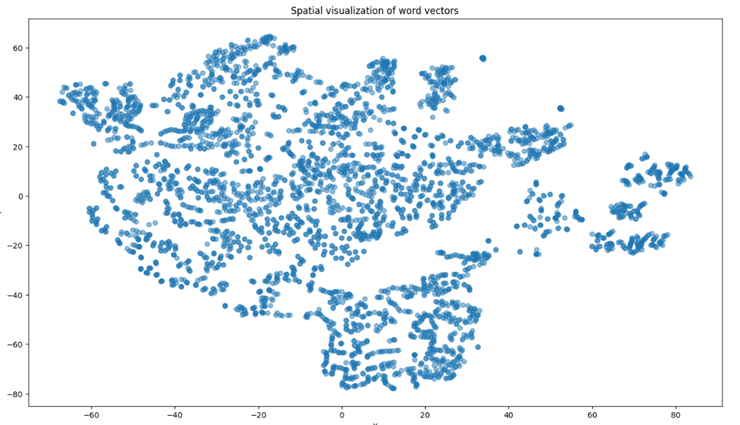
The image shows a spatial visualization of word vectors in a two-dimensional space. Each point represents a word vector, and the distribution of these points indicates the relative semantic similarity between different words. Points that are closer together likely represent words with similar meanings or contexts, while points that are farther apart represent words that are more dissimilar.
This visualization helps us understand how word vectors, derived from high-dimensional embeddings, capture the nuanced relationships between words based on their usage in the text.
Following this visualization, we delve into a comprehensive overview of the data cleaning, preprocessing, and analysis workflow for sentiment analysis tasks. This process ensures that the dataset is of high quality and suitable for training robust models. The steps include data filtering, text preprocessing, sentiment annotation, word embedding representation, and dataset splitting, all of which are crucial for building an effective sentiment analysis model.
1 Data Source
This study collected extensive customer review data from the well-known restaurant chain Jiji Hong Hotpot.
2 Data Filtering
Ensuring the quality of the dataset before conducting research is crucial for obtaining accurate and reliable results. This study uses OpenRefine for efficient data cleaning and filtering to ensure dataset quality and consistency. The detailed steps for data filtering are as follows:
2.1 Selecting Relevant Fields
The first step in data filtering is identifying and extracting fields directly related to sentiment analysis tasks. In the customer reviews dataset of Jijihong Hotpot, the two key fields are:
- Review Details: Contains detailed descriptions and sentiment expressions of customers' dining experiences.
- Review Tags: Indicates overall customer satisfaction with the service or food.
These two fields serve as the main inputs and labels for model training.
2.2 Removing Duplicates and Missing Values
Ensuring data completeness is crucial for analysis quality. Records with missing or incomplete review details should be removed. In the review details field, 893 duplicate records were identified and removed, resulting in 10,033 valid records.
2.3 Removing Outliers
Texts that are unusually short or unclear, such as single emojis or words, are removed to ensure substantive content for analysis. A minimum text length standard is set to enhance model training effectiveness.
After these data filtering steps, a cleaner and more standardized dataset is obtained, laying a solid foundation for subsequent preprocessing, feature extraction, and model training.
3 Text Preprocessing
The review texts undergo standardized text preprocessing, including removing irrelevant characters, tokenization, stop word filtering, part-of-speech tagging, and stemming.
3.1 Environment Setup
Use Python environment and install necessary libraries such as jieba, HanLP, pandas, and numpy.
3.2 Text Encoding
Ensure all text data uses a uniform encoding format (UTF-8) to avoid encoding errors during text processing.
3.3 Removing Irrelevant Characters
Use regular expressions to remove HTML tags, URLs, numbers, and special characters, reducing noise during model training.
        df['text'] = df['text'].str.replace(r'<[^>]+>', '', regex=True)  # Remove HTML tags
        df['text'] = df['text'].str.replace(r'http\S+', '', regex=True)  # Remove URLs
        df['text'] = df['text'].str.replace(r'\d+', '', regex=True)  # Remove numbers
3.4 Privacy Information Removal
Identify and replace or remove possible personal information such as phone numbers and email addresses.
df['text'] = df['text'].str.replace(r'\b\d{11}\b', ' ', regex=True) # Replace 11-digit phone numbers with blank
3.5 Text Tokenization
Add proprietary nouns to the jieba dictionary before tokenization to ensure correct segmentation of brand names and other special terms.
        import jieba
        jieba.add_word('季季红', freq=100)  # Add brand name with frequency adjustment
        df['text'] = df['text'].apply(lambda x: ' '.join(jieba.cut(x)))  # Tokenize text
3.6 Stop Word Removal
Use the Harbin Institute of Technology stop words list to filter out irrelevant words in text analysis.
        stopwords = set(open('stopwords_hit.txt', 'r', encoding='utf-8').read().split())
        df['text'] = df['text'].apply(lambda x: ' '.join(word for word in x.split() if word not in stopwords))
3.7 Synonym Processing and Standardization
Create a synonym dictionary to unify different expressions with the same meaning, enhancing consistency in the dataset.
        synonym_dict = {'满意': '喜欢', '好吃': '美味'}
        df['text'] = df['text'].apply(lambda x: ' '.join(synonym_dict.get(word, word) for word in x.split()))
3.8 Text Length Standardization
Ensure text length uniformity according to model requirements, trimming excessively long texts and padding short texts to a standard length of 512 words.
        max_length = 512
        df['text_trimmed'] = df['text'].apply(lambda x: ' '.join(x.split()[:max_length]))
4 Sentiment Annotation
After basic text preprocessing, sentiment annotation assigns a sentiment label (positive, negative, or neutral) to each text.
4.1 Automated Sentiment Analysis
Perform initial sentiment tagging using automated tools, followed by manual corrections for specific domain texts.
5 Word Embedding Representation
Word embedding converts textual data into numerical forms understandable by machines. This study uses the BERT model for deep semantic understanding of text data.
5.1 Environment Preparation
Ensure installation of necessary libraries like TensorFlow and transformers.
        pip install tensorflow transformers
        import tensorflow as tf
        from transformers import BertTokenizer, TFBertModel
5.2 Loading Pretrained Model
Load the 'bert-base-uncased' model and tokenizer from the transformers library.
        tokenizer = BertTokenizer.from_pretrained('bert-base-uncased')
        model = TFBertModel.from_pretrained('bert-base-uncased')
5.3 Text Preparation and Tokenization
Import preprocessed text data and use the BERT tokenizer to convert texts into token sequences.
        df = pd.read_csv("data_syn.csv", encoding='utf-8')
        texts = df['text'].astype(str).tolist()
        encoded_input = tokenizer(texts, padding=True, truncation=True, return_tensors="tf")
5.4 Generating Word Embeddings
Use the BERT model to generate word embeddings, capturing the semantic information of each word in its context.
        outputs = model(encoded_input)
        last_hidden_states = outputs.last_hidden_state
5.5 Evaluation and Application
Store the generated embeddings for sentiment analysis and other tasks, evaluating their quality through model performance.
6 Data Loader
Due to the large data volume, a data loader is designed to improve model training efficiency and effectiveness. TensorFlow's data pipeline API is used to create a data loader that batches, shuffles, and prefetches data, ensuring efficient data transmission during training.
7 Dataset Splitting
Proper dataset splitting is crucial for model training, ensuring diverse learning and performance validation.
7.1 Training Set
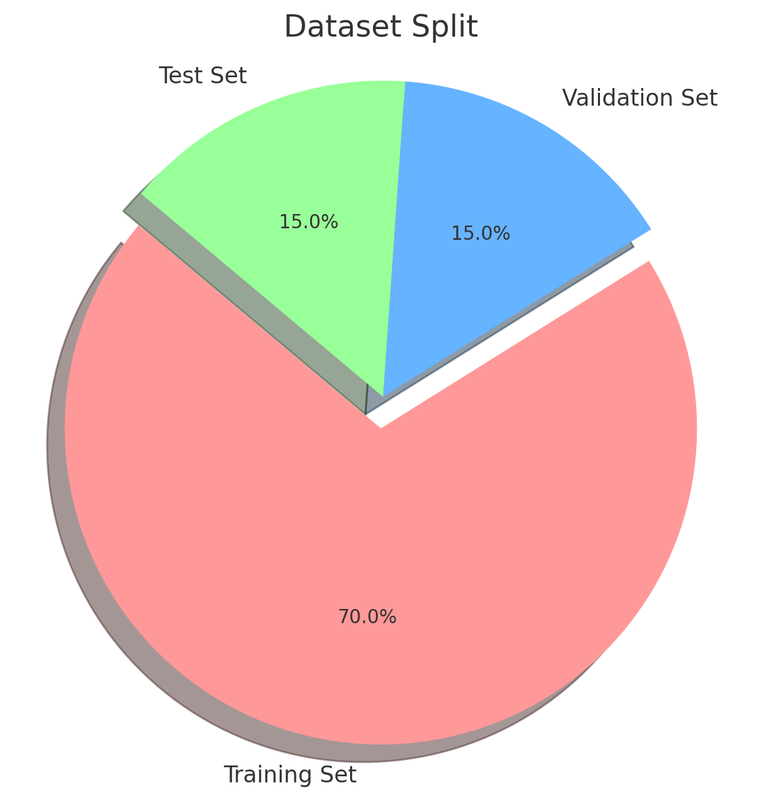
Consists of approximately 70% of the data for model learning.
7.2 Validation Set
Occupies about 15% of the data for performance evaluation and hyperparameter tuning.
7.3 Test Set
The remaining 15% of the data is used for unbiased performance evaluation after training.
The dataset is split before the experiments, considering class balance to avoid model bias.
This overview summarizes the comprehensive process of data cleaning, preprocessing, and analysis, ensuring the preparation of a high-quality dataset for sentiment analysis.
The designed pie chart showing the dataset split into 70% Training Set, 15% Validation Set, and 15% Test Set.